Economy Class


Stay Connected with Scoot Inflight Wi-Fi.


Whether you're staying in touch, catching up on work or planning your itinerary, Scoot inflight Wi-Fi helps you stay connected throughout your flight. Available on Scoot Boeing 787 Dreamliners. Purchase before your flight and enjoy savings of up to 50%.

Add Wi-Fi to your booking

Flying in ScootPlus? 200MB Wi-Fi is already included in your fare.


Make the Most of Your Time in the Air

With Wi-Fi, you can:

Stay productive

Plan your trip or finish up work so you're ready when you arrive.
 

Stay entertained

Browse social media or stream music while you sit back and relax.

Stay in touch

Don’t miss messages, conversations or what’s happening on the ground.


Discover which Wi-Fi plan is right for you

Choose from a range of Wi‑Fi plans to suit your needs and budget. Every plan comes with a fixed data allowance, so you'll know exactly what you're paying for.


Pre-purchase Usual price onboard
50MB80MB★ Popular Choice 200MB 1GB
US$4.50US$7.50US$15US$53
US$8US$15US$30US$55
💬Messaging▰▰▰▰▰▰▰▰▰▰▰▰▰▰▰▰▰▰▰▰
📧Email▱▱▱▱▱▰▰▰▰▰▰▰▰▰▰▰▰▰▰▰
🌐Browsing▱▱▱▱▱▰▰▰▱▱▰▰▰▰▰▰▰▰▰▰
📱Social Media▱▱▱▱▱▱▱▱▱▱▰▰▰▰▰▰▰▰▰▰
🛒Online Shopping▱▱▱▱▱▱▱▱▱▱▰▰▰▰▰▰▰▰▰▰
🎧Audio Streaming▱▱▱▱▱▱▱▱▱▱▱▱▱▱▱▰▰▰▰▰
▶️Video Streaming▱▱▱▱▱▱▱▱▱▱▱▱▱▱▱▰▰▰▰▰

Terms and Conditions
  1. 50MB Wi-Fi plan is unavailable for onboard purchase for flights to/from Australia, Austria, and Greece.
  2. Your Wi-Fi session duration starts from the time you first log in till your data plan reaches your data limit. Sign up for an account onboard, and unconsumed data can be continued on your onward flight within 24 hours operated by Scoot B787 Dreamliner aircraft equipped with.
  3. You may purchase Wi-Fi when you book your flights or via Manage My Booking up to 2 hours prior to your flight departure.
  4. Wi-Fi available only on Scoot B787 Dreamliner aircraft equipped with Panasonic connectivity.
 

How to purchase Wi-Fi

  1. Before your flight (Recommended)

    You can add Wi-Fi when booking on flyscoot.com or via Manage My Booking up to 2 hours before departure.

    Your Wi-Fi access code will be sent to your email after your purchase is confirmed. Alternatively, it can be found on your Home Printed Boarding Pass*, your Digital Boarding Pass* and on your Manage My Booking page. (*Applicable in certain countries only).


  2. Onboard your flight

    Connect to the 'Scoot_WiFi' hotspot network, launch the inflight portal on your browser, and purchase your selected Wi-Fi plan.


How to access Wi-Fi on your flight

Economy Class

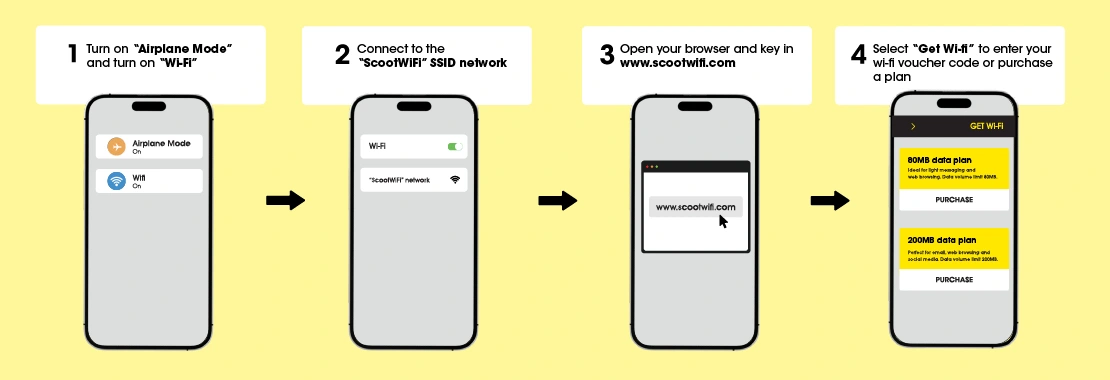
  • Once your flight reaches cruising altitude, enable Wi-Fi on your device and connect to the 'Scoot_WiFi' network.
  • Launch your web browser and wait for the Wi-Fi portal loading page. Alternatively, enter www.scootwifi.com to load the portal.
  • Proceed to purchase Wi-Fi on board, or login to your session with your Wi-Fi login details or access code if you have already pre-purchased Wi-Fi.

Having trouble connecting?

Try these quick fixes:

  • Forget and reconnect to the 'Scoot_WiFi' SSID network
  • Clear your browser's cache and cookies
  • Use a different browser or switch to incognito mode
  • Restart your device
  • Try reconnecting after a few minutes
  • Ensure your VPN is turned off


For more info, refer to the Help & FAQs on our inflight portal.


Tips on staying connected for longer

Stay online throughout your flight

  • Deactivate automatic software updates.
  • Lower video resolution when streaming.
  • Close background apps to avoid unnecessary data consumption.
  • Choose a plan that matches your online activity.

Stay powered up 

Keep your devices charged throughout your flight with in-seat power outlets*. With standard 110V/60Hz charging outlets, you can charge all your gadgets during your flight.

ScootPlus passengers enjoy complimentary access to in-seat power outlets on every seat. Economy customers can purchase power outlet access for a small fee.

* Available on Scoot’s Boeing 787 Dreamliners.


Frequently Asked Questions

Which flights have Wi-Fi available?

Wi-Fi is available on all Scoot Boeing 787 Dreamliners.

How is my Wi-Fi usage tracked?

Your Wi-Fi data session starts from the moment you first log in till your data plan reaches your data limit. The session will expire once there is no balance remaining.

Can I access Wi-Fi on multiple devices?

Yes, but only one device can be connected at a time. To switch between devices, simply sign up for an onboard Wi-Fi account and log in with the same account on your preferred device.

What credit cards are accepted for onboard Wi-Fi purchases?

Mastercard, Visa, American Express, Diners Club, JCB and China UnionPay are accepted.

Is Wi-Fi connectivity available at all stages of the flight?

Wi-Fi connectivity is only available when the aircraft is at an altitude of 10,000 feet or higher.

How fast is the Wi-Fi connection?

You should experience speeds similar to the public Wi-Fi/WLAN connections available on the ground. But the actual bandwidth relies on several factors, including the satellite connection to the aircraft, the number of aircraft connected to the satellite, weather conditions, and the number of passengers concurrently using the service.

Can I use YouTube or other streaming video services on Wi-Fi?

Yes, but you may experience occasional delays and buffering depending on your video resolution and the actual Wi-Fi bandwidth at the time of your use. For the best streaming experience, we recommend purchasing the 1GB data plan.

I purchased Wi-Fi, but it was not available or not working on my flight. Where can I get a refund?

If you had pre-purchased Wi-Fi before your flight and wish to provide feedback or request a refund, please contact our Call Centre. If you purchased Wi-Fi onboard, please contact Panasonic Customer Care Centre via email at scoot.customercare@panasonic.aero.